Agent Ecosystem OS · Self-hosted · Model agnostic

One platform.
Every agent.

Kaptain is the operating layer for your agents. Build specialized agents, connect them through a shared communication layer, assign work across the models you choose, and keep every workflow under your control.

Every harness and every model in one picker. Choose one, ask, and watch it use the tools you allow.
Recent workmodel · outcome
  1. Q3 spend per vendor vs. policy limits, three overages flaggedclaude-cli · 3 tools · answered
  2. incident-digest: this morning's digest for the operations leadqwen3.5:4b · scheduled · review passed
  3. release-notes: customer-facing notes for 2.4.0 in the house styleclaude-cli + skill · drafted
  4. Pending invoices per vendor from the Q3 exportclaude-cli · answered
  5. Rate-card tests: does Resolve pick the newest valid tariff?claude-cli · tests run · answered
  6. Month-end close checklist from what the incident log says went wrongclaude-cli · answered
// YOUR ECOSYSTEM

Your ecosystem,
under your control.

Kaptain gives agents a common home: a place to communicate, retain useful context, receive work, and remain observable while you decide how each workflow should run.

01 · ROUTING

Granular control

Assign work to premium, lighter, cheaper, or local models according to the task and your priorities.

02 · MEMORY

Persistent continuity

Retain useful context and build reusable knowledge across ongoing work.

03 · COMMUNICATION

Agents that connect

Talk to Kaptain in its chat, to each kapsule in its own chat, and let agents call each other when you allow it.

04 · OBSERVABILITY

Visible by design

Inspect traces, review approvals, and understand what your agents are doing.

Works with Claude Code OpenAI Codex Gemini Ollama llama.cpp / GGUF OpenAI-compatible endpoints Linux, macOS, Windows
// MODEL-AGNOSTIC WORKFLOWS

Move work where
it belongs.

Use the right model for the right task. Kaptain lets you create workflows across local and cloud models while keeping assignment logic, agent tools, and execution boundaries in your hands.

Your tasktoKaptain supervisor
ReasoningtoPremium model when depth matters
DelegatetoLighter, cheaper, or local model when appropriate
ReviewtoTrace, approval, reusable memory
// BUILD AND COMMUNICATE

Create your own agent.
Or a swarm.

An Agent is one specialist with its own behaviour, model, tools, workspace, memory, tasks and schedule. A Swarm is a kapsule allowed to bring in workers: a pool of agents with Kaptain's plumbing directly attached, working together on your task or workflow: shared board, handoffs, evidence-gated workers, one permission ceiling. Work with either from the Kaptain chat or from the kapsule's own chat.

Kapsule · release-notesclaude-cli · skill: release-notes-style
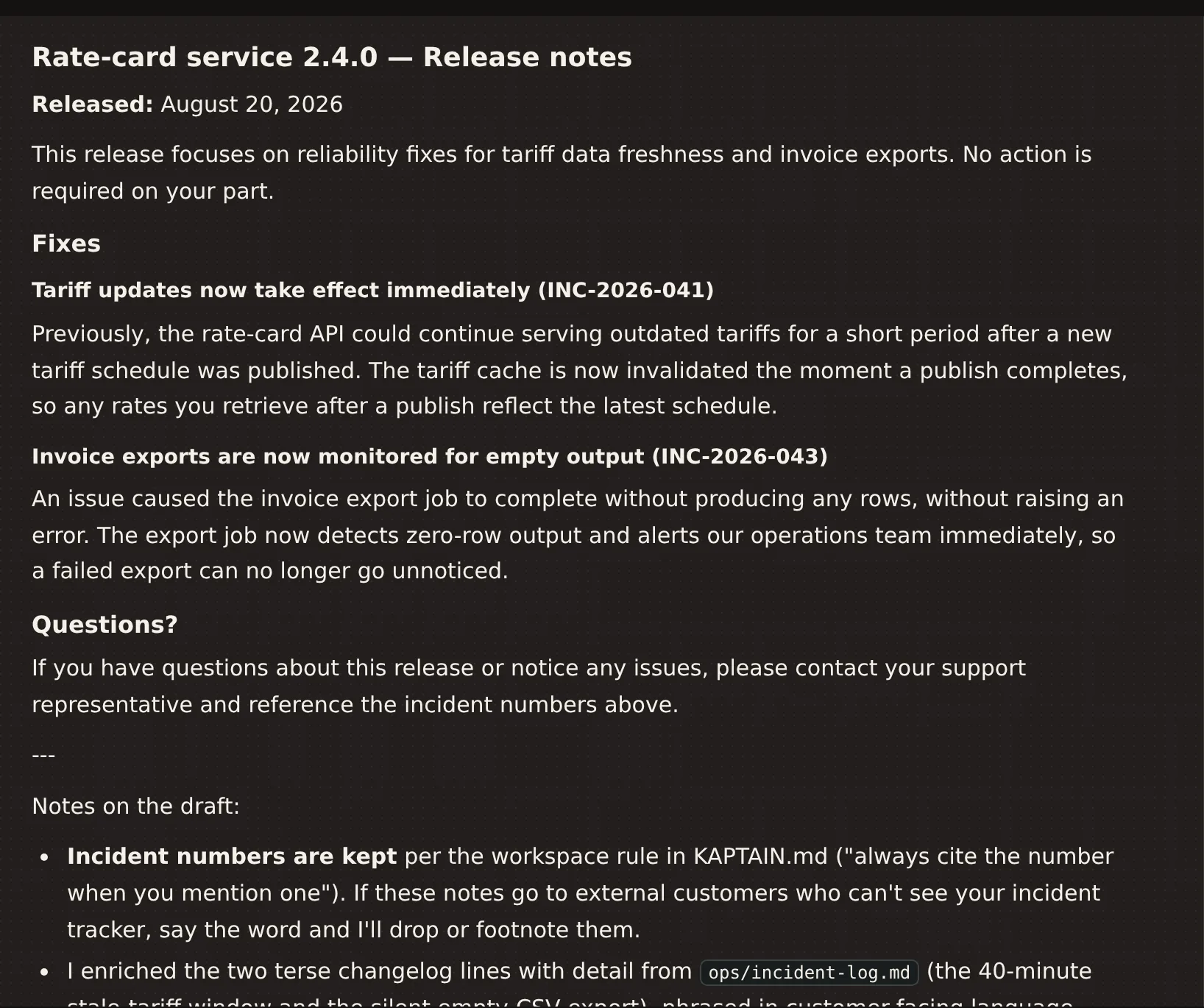
A Kapsule named release-notes, running on a Claude CLI model with a house-style skill, has drafted customer-facing release notes for version 2.4.0 from the workspace changelog and incident log, citing incident numbers, and lists its notes on the draft.
An agent that knows your house style writes the notes from your own records. You review, it ships.
// TASK OFFLOADING

Delegation, defined by you.
Frontier reasoning when it counts.

Delegation in Kaptain is a router you configure, not a rule we impose. Point it one way and a powerful model, such as a Claude or Codex CLI, becomes the delegate: called only when a task needs frontier reasoning, while a light local model carries the rest. Point it the other way and work fans out across your own cluster of local and cloud models, split by task and by load. Local, remote or cloud, you decide what handles what. Kaptain gives you the plumbing to connect or add those resources without the hassle.

TOKEN USAGE

Model-agnostic delegation can reduce unnecessary premium-model usage by keeping routine work, evidence compression, and repeatable helper tasks on the routes you select.

Read the full explanation
// INSPECT THE WORK

See the flow.
Understand the work.

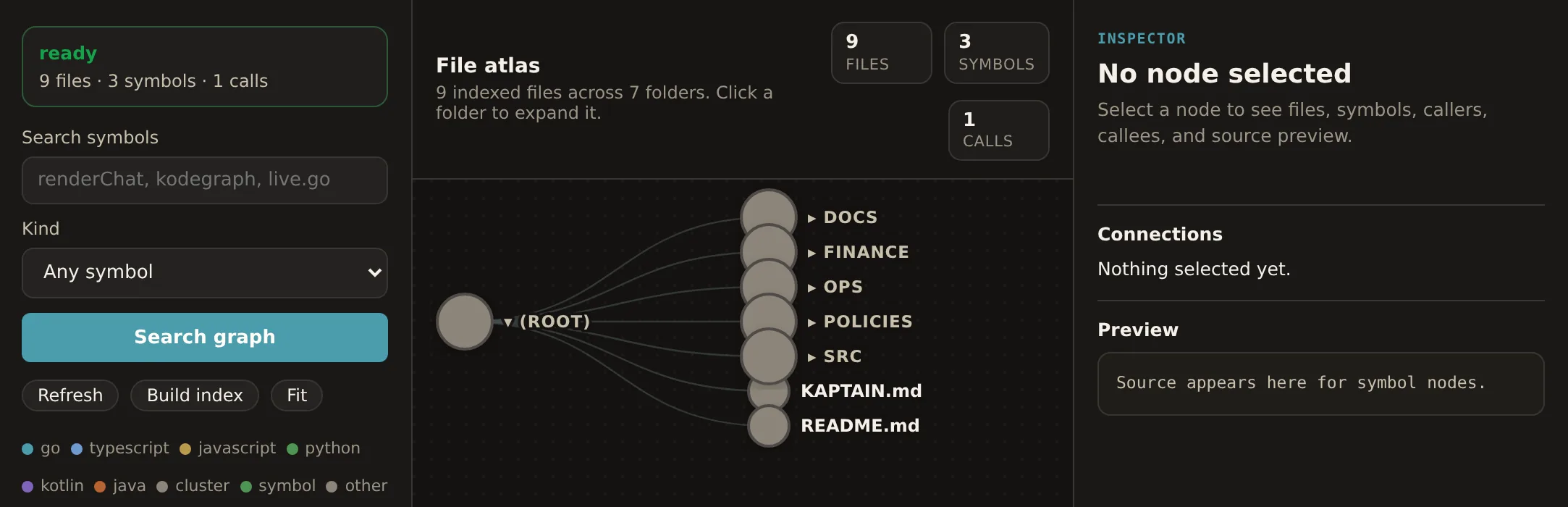
BlackBox Traces shows request flow, models, context, tools, token totals, errors, and response previews. God's Eye View maps files, folders, functions, routes, symbols, and relationships.

Nothing hidden. Tap a turn and scroll through the exact context sent, every tool call, and the reply.
God's Eye file atlas of a project: index status, symbol search, a folder graph radiating from the project root, and an inspector panel.
Your project as a graph you and your agents both navigate.
// DEVIEW

Your developer view.
An IDE inside Kaptain.

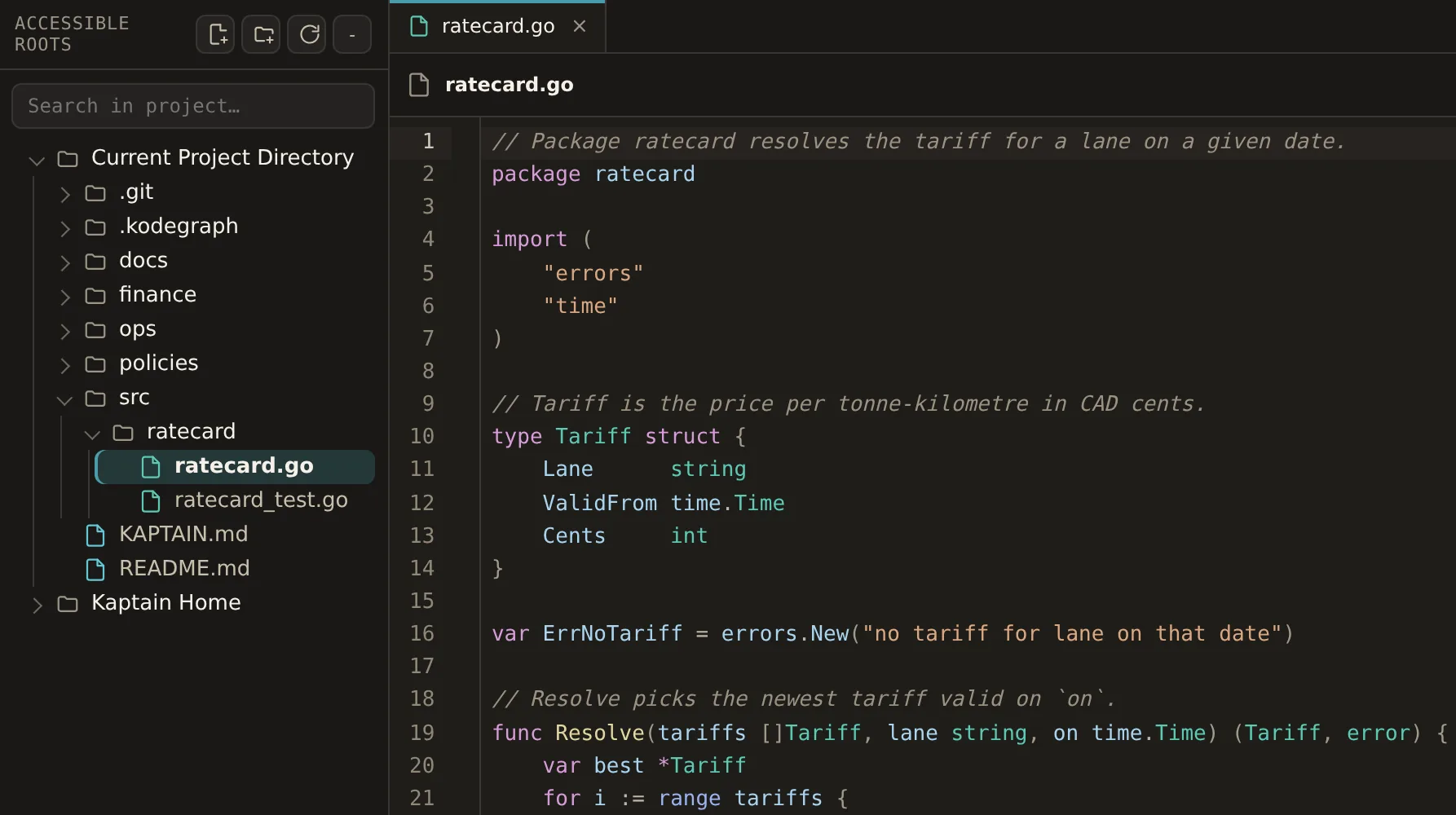
Deview is the IDE experience built into Kaptain: the project tree, an editor with Read, Edit and Preview modes, and project-wide search, all on the same root your agents work in. Open the file an agent just changed, fix a line, save, and keep your place. No second copy of your project, no switching windows.

Deviewworkspace · src/ratecard/ratecard.go
Deview: the project tree on the left with the sample repository's folders, and a Go source file open in the editor with line numbers and a Read/Edit switch.
Edit and save in the same root your agents work in. No copy of the truth.
// OPERATE THE SYSTEM

Keep ongoing work
understood.

01 · APPROVALS

Secured interaction

Review sensitive actions and keep execution boundaries visible.

02 · BRAIN LOGS

Useful activity records

Inspect what Kaptain and its agents are doing during ongoing work.

03 · SCHEDULES

Recurring work

Schedule tasks and keep notifications attached to the workflow.

04 · REMOTE ACCESS

Reach your machine

Use your browser or Android companion internal beta through your secured network setup.

Kapsules overview table: each kapsule with its model, cron schedule, last run status and review result, memory count and swarm setting.
Every agent's model, schedule, last run and memory at a glance. You always know what ran.
// GET STARTED

Install to running agents.
Keep the choices yours.

STEP 01Install KaptainRun the installer on Linux, macOS, or Windows. The 3-day trial starts automatically.
STEP 02Connect your providersUse Claude Code, Codex, Gemini, Ollama, llama.cpp / GGUF, or a custom OpenAI-compatible endpoint.
STEP 03Build agents and assign routesSet behavior, workspace, model choice, tools, memory, tasks, and schedules.
STEP 04Run, inspect, refineUse traces, approvals, logs, Deview, and God's Eye View as the workflow grows.
// CHYNJ INSIGHTS

Research for the
agent ecosystem.

Token economics deserves depth without hijacking the product page. Read the reasoning behind model routing, task delegation, persistent continuity, and secured interaction.

// PRICING

One subscription.
Kaptain, monthly.

Free for 3 days. Then one monthly subscription for independent users, with up to 5 devices in your cluster.

Free Trial
CA$0/ 3 days

No credit card required

Try Kaptain for 3 days. Build, and see for yourself how it runs several flows natively across several harnesses, all together.

  • Kapsules: agents and harnesses, built in the UI
  • Your CLIs, local and cloud models, in one place
  • Approvals, BlackBox traces, God's Eye, Deview
  • Schedules, memory, skills, delegation
Install - 3 days free
Teams & organisations
Let’s talk

Beyond 5 devices

For teams that need more devices in the cluster or a support agreement. Tell us what you run and how many people work in it.

Contact us

Build your agent ecosystem.

Start locally. Choose your models. Keep the workflow visible.

Get Kaptain - Free trial